Markdown Tip: Displaying Tables
Markdown Cells Tips
To create a table
Create a table using pipes "|" and dashes "-"
Step 1: Change markdown dropdown from "Code" to "Markdown"


In your code cell, type in the following, replacing the text with your own information.
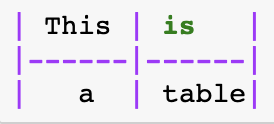
will give you this:
| This | is |
|---|---|
| a | table |
This method is great for simple tables, but not recommended for larger table.
Create a table using IPython.display
Step 1: import dependencies from IPython.display import HTML, display
from IPython.display import HTML, display
Step 2: Create a list of arrays with your text
data = [["Fruits","Dairy","Meats"],
        [3,4,5],
        [6,7,8],
        ]
Step 3: Use the display function. This function is used to display different representations of objects.
from IPython.display import HTML, display

data = [["Fruits","Dairy","Meats"],
        [3,4,5],
        [6,7,8],
        ]

display(HTML(
   '<table><tr>{}</tr></table>'.format(
       '</tr><tr>'.join(
           '<td>{}</td>'.format('</td><td>'.join(str(_) for _ in row)) for row in data)
       )
))
Create a table using IPython.display and tabulate
Step 1: pip install tabulate https://pypi.org/project/tabulate/
from IPython.display import HTML, display
import tabulate
Step 2: Create your table using a list of arrays.
table = [["Fruits","Dairy","Meats"],
         ["Apples","Cheese","Beef"],
         ["Figs","Milk","Chicken"],
         ["Peaches","Yogurt","Rabbit"]
        ]
Step 3: Use the display function to render your table array in html.
display(HTML(tabulate.tabulate(table, tablefmt='html')))
Create a table using pandas
Step 1: Install pandas https://pandas.pydata.org/pandas-docs/stable/install.html
import pandas as pd
Step 2: Add your table information in an list of lists.
data = [["Apples", "Cheese", "Beef"], ["Figs", "Milk", "Chicken"], ["Peaches","Yogurt","Rabbit"]]
Step 3: Use pandas DataFrame function
pd.DataFrame(data, columns=["Fruit", "Dairy", "Meats"])
Create a table using tabletext
Step 1: import tabletext
import tabletext
Step 2: Add your table information in an list of lists.
data = [["Fruit", "Dairy", "Meat"], ["Apples", "Cheese", "Beef"], ["Figs", "Milk", "Chicken"], ["Peaches","Yogurt","Rabbit"]]
print (tabletext.to_text(data))